A game engine designed for creating 3D and soon™ 2D games. It is built with a focus on performance, flexibility, and ease of use.
It is written in C++ and relies on OpenGL graphics API for rendering.
History
Development of dBengine began in late March 2025. It was initially a university project that would later enable us to create a 3D game.
My goal was to not create an engine for a specific game, but to build a versatile tool that could be used for various types of games.
It underwent several iterations and improvements, with feedback from early users helping to shape its
development.
Main changes were to the design of the editor - Yes! - dBengine contains a
built-in
editor to boost productivity and streamline the game development process.
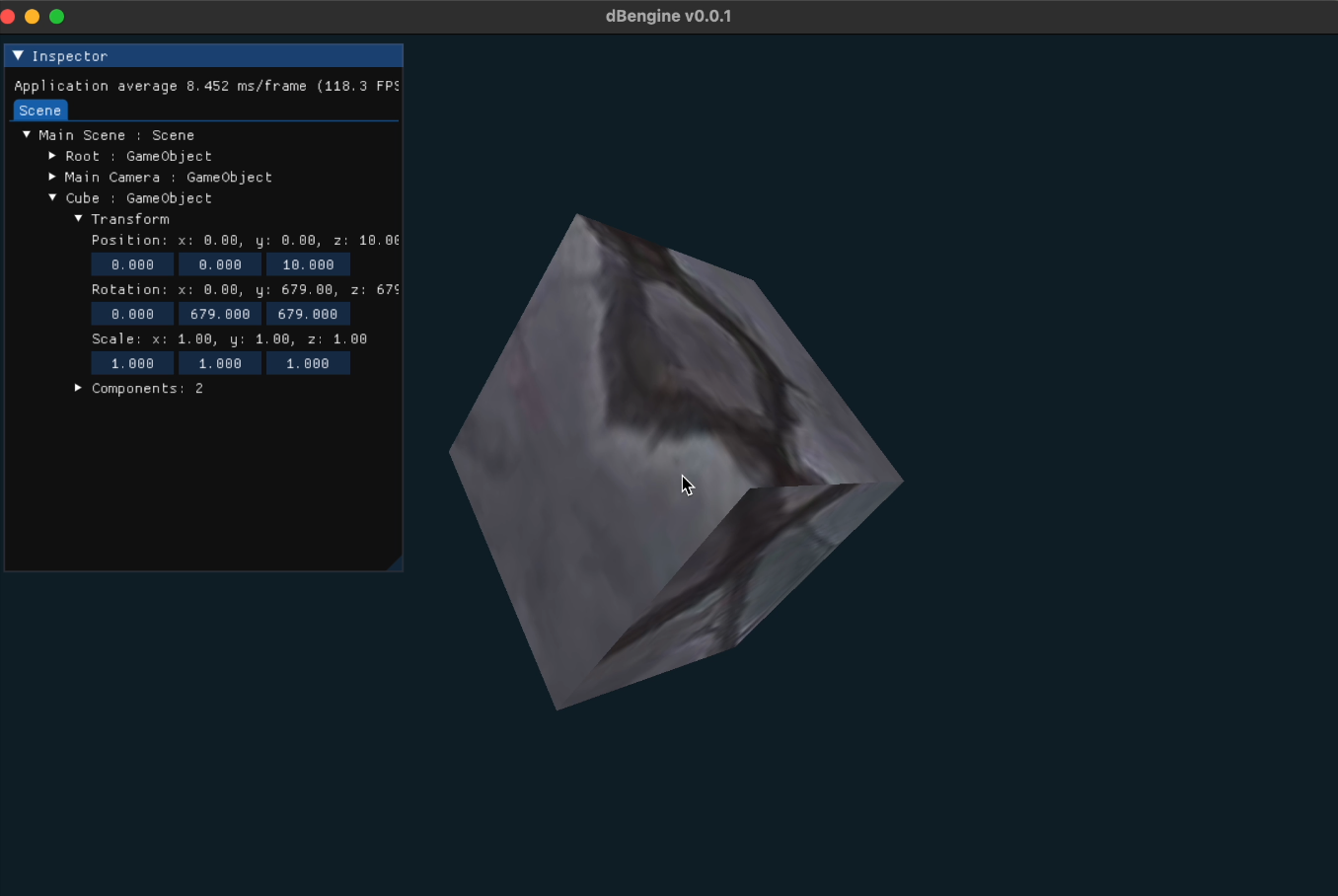
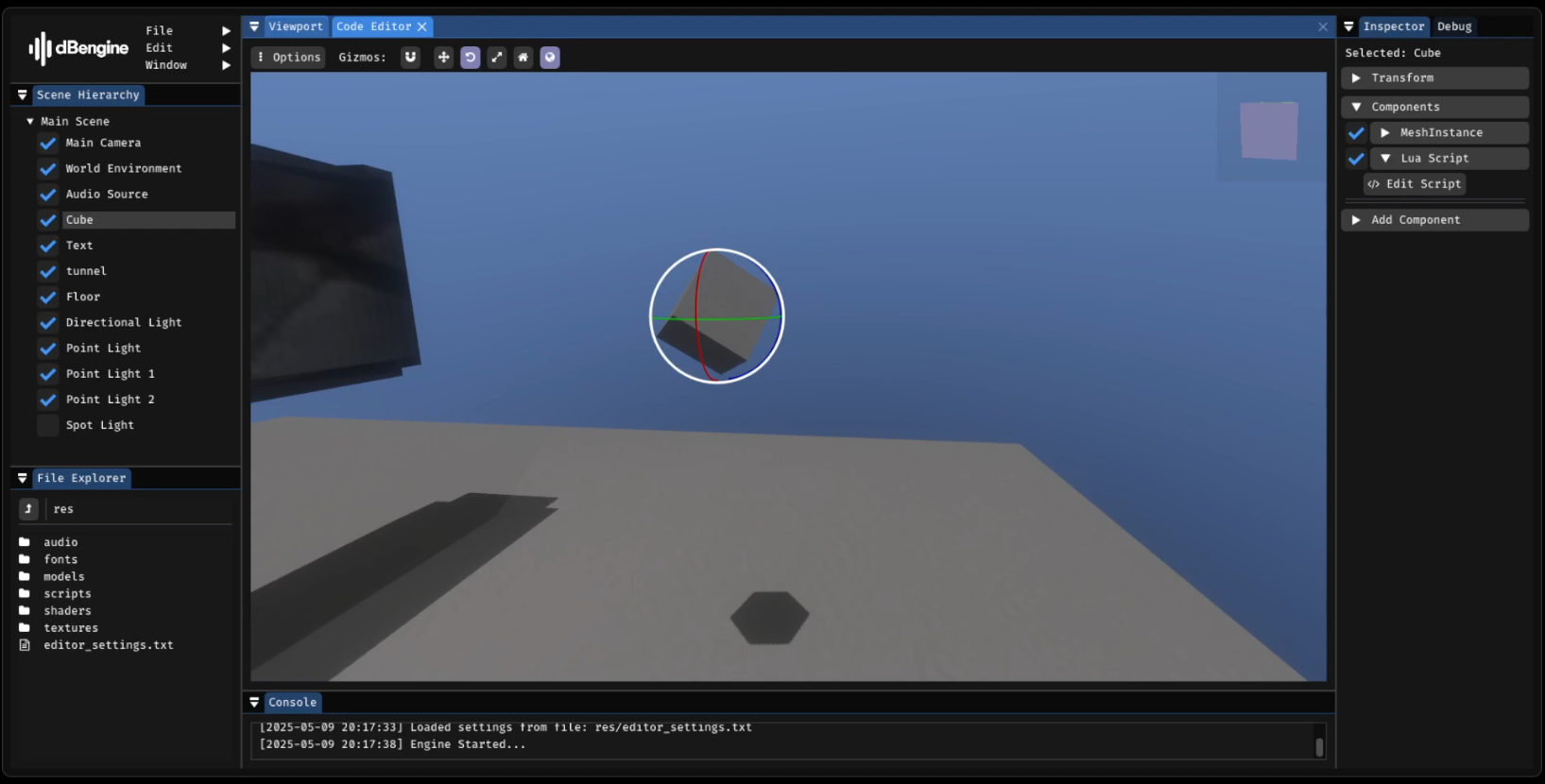
This is the first screenshot of dBengine and its' editor.
As you can see, the interface of the editor was really simple back then. But the most important thing shown on it is the first cube rendered by the engine. It was the big achievement for me at that time.
Next iteration of the editor introduced the next crucial functionality of the engine - scripting.
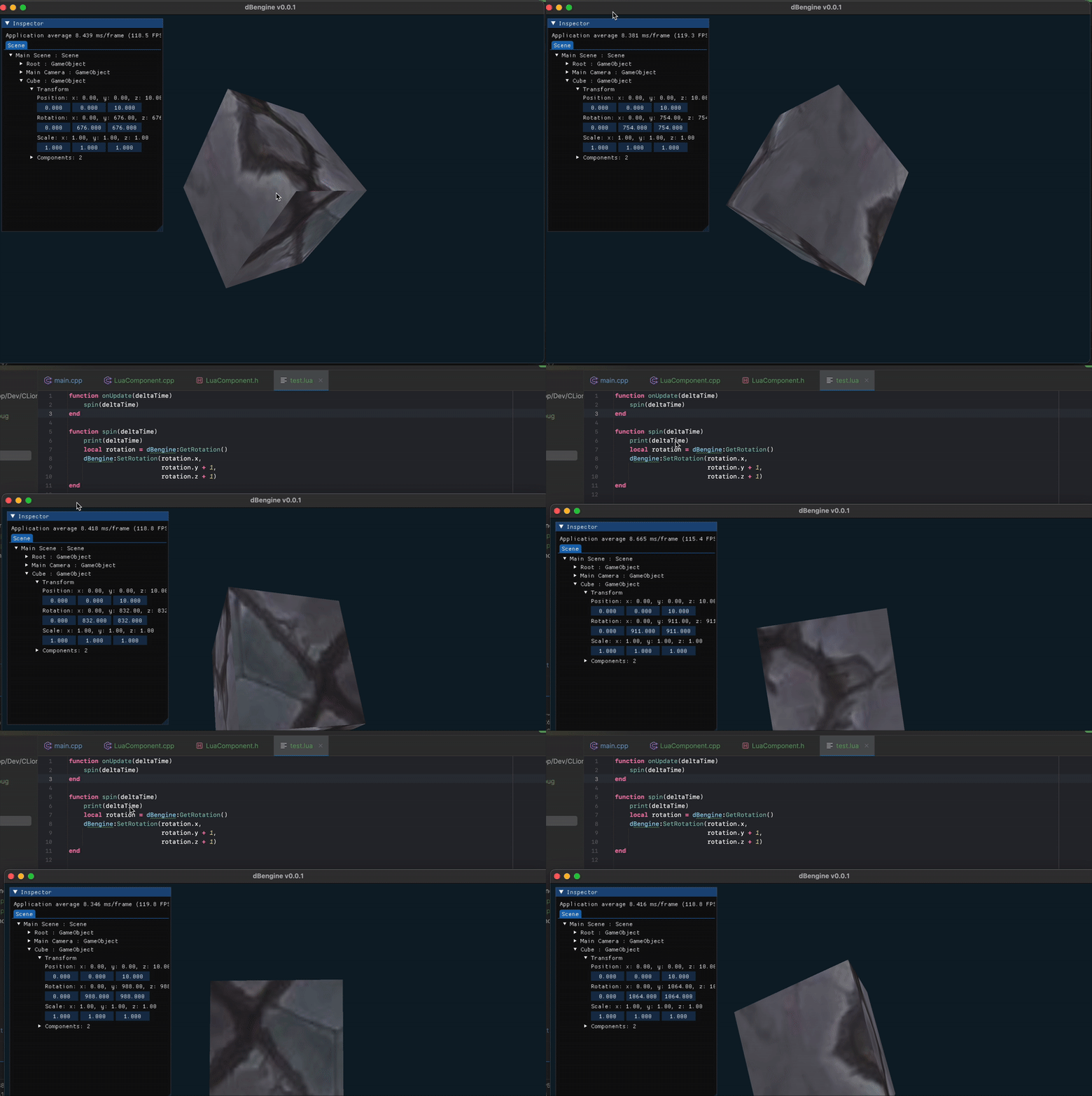
The spinning behavior of the cube was achieved through a script written in
Lua.
The first scripting functionality was a significant milestone for dBengine, as it created a clear separation between the game logic and the engine itself. This allowed for greater flexibility and easier modifications in the future, as the gameplay could be easily adjusted without altering the core engine code.
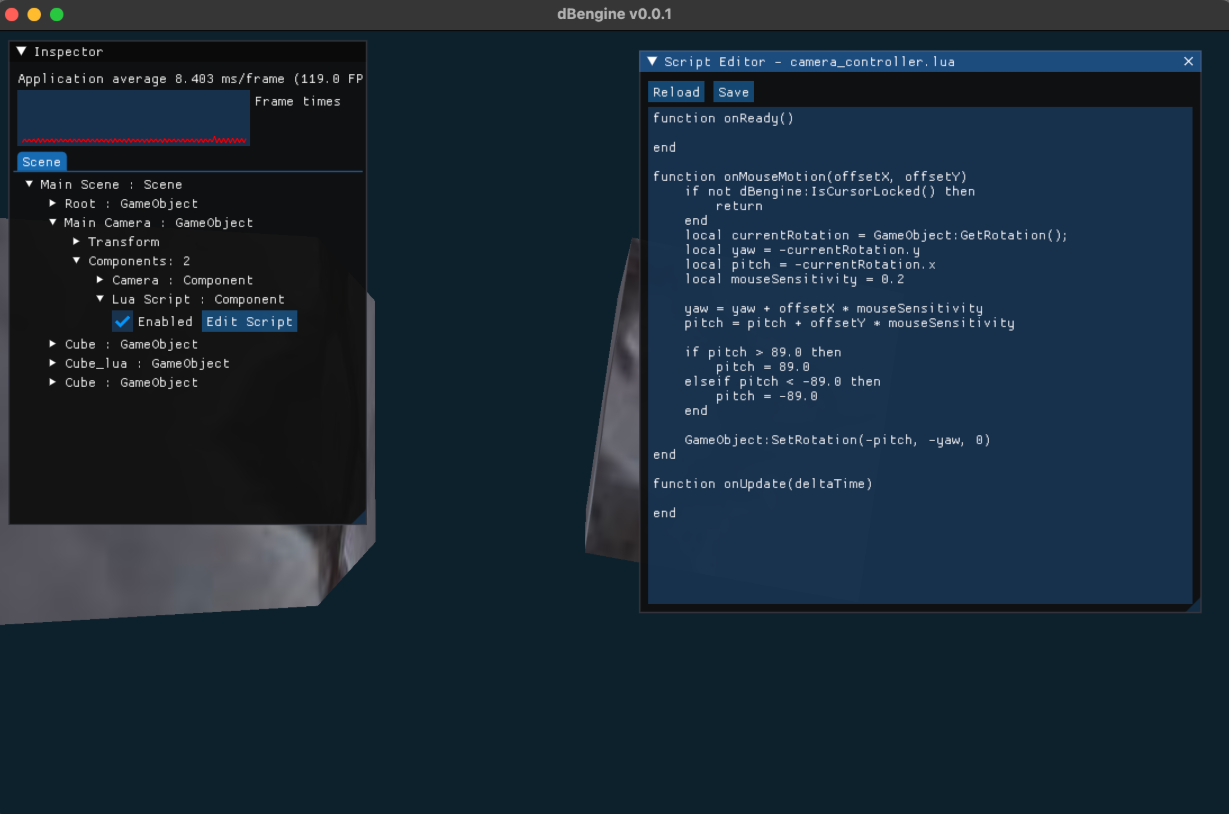
With scripting came a really simple code editor built-in to dBengine's editor, allowing for easy editing of scripts directly within the engine.
As the engine evolved, it was clear to me, that editor needed a complete overhaul to accomodate for engine's more advanced features and improve overall usability.
Video showcases the improved editor interface and its new features.
New and improved editor introduced:
- Redesigned user interface for better usability
- Ability to instantiate game objects
- Integrated debugging information and console
- Inspector for manipulating game objects and their components
But I didn't stop there. The editor continued to evolve to differentiate itself from other engines available at ZTGK challenge.
I've decided to theme the editor to give it a more modern and polished look (and to avoid being just another ImGui wannabe editor).
And when I say themes... I mean it.
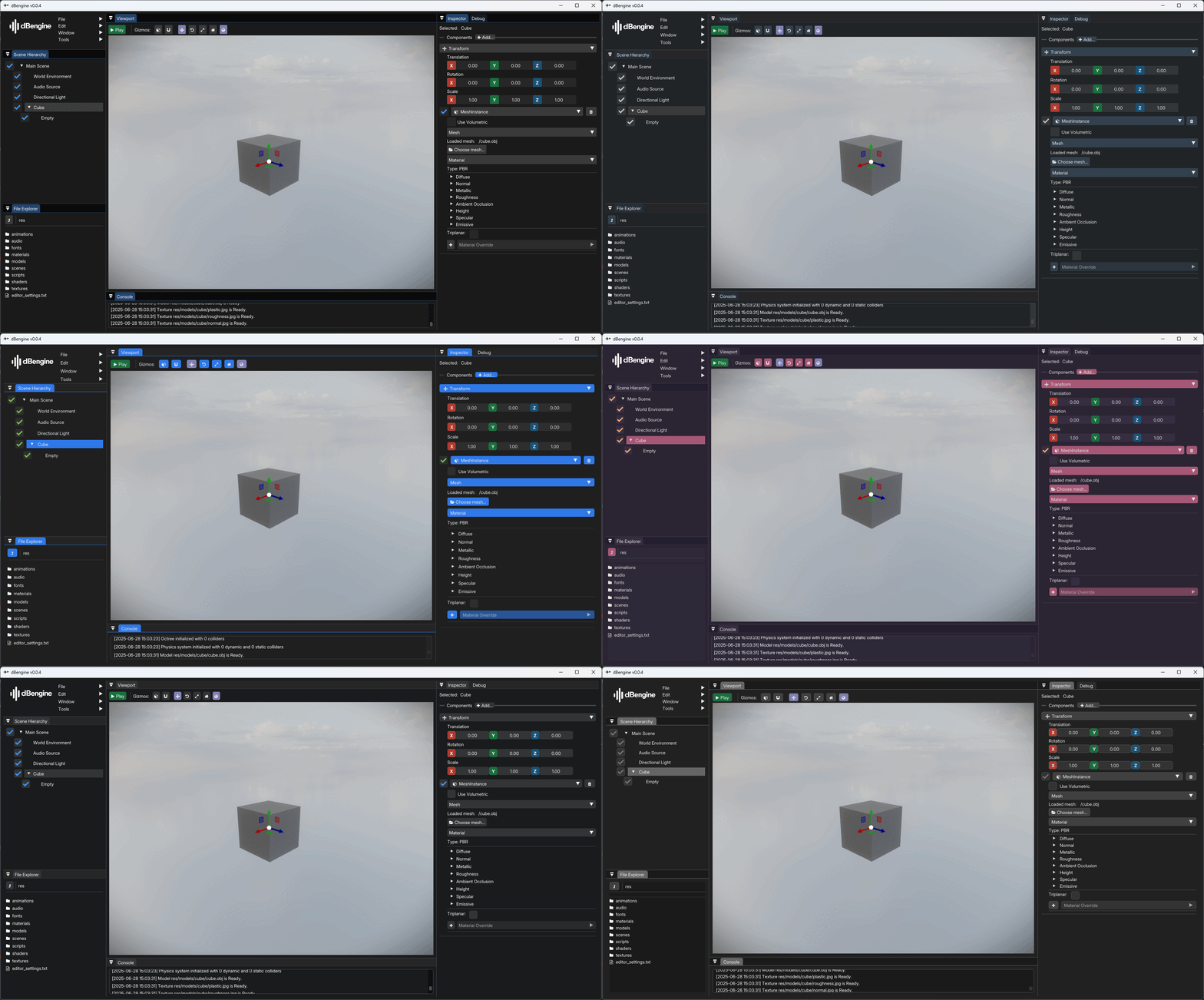
Users are able to choose from a variety of themes to customize their editing experience, as well as create their own.
... And I think that's all for the history of dBengine... for now - of course.
Features
dBengine is full of features designed to enhance the game development experience. However, the engine itself is split into 4 main components:
- dBengine
- dBrender
- dBphysics
- dBeditor
Each component serves a specific purpose and is designed to work seamlessly with the others.
dBengine
This is the core. It handles the initializations of the game window and other components. It's also responsible for managing the main game loop and updating the game state.
dBengine allows users to create input actions and can detect if they are:
- just pressed
- just released
- held down
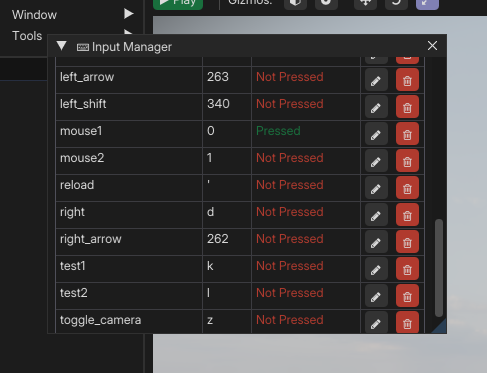
Input manager is available in the editor.
Scenes and materials are preserved thanks to a custom serialization system. It allows for easy saving and loading every scene, resource in the game.
Files are in .yaml format, however for specific types, different extensions
are
used:
- Scenes -
.scene - Resources -
.res
The resource manager is responsible for loading and managing resources such as textures, models, and materials. It ensures that resources are loaded only once and reused to improve performance and reduce memory usage.
dBengine supports asynchronous loading of resources (for Resource Manager) and scenes, as well as processing animations, allowing for smoother gameplay and faster loading times.

Loading of the engine without asynchronous loading.

Loading of the engine with asynchronous loading.
Engine allows users to write scripts in Lua to control game
logic and behavior. Scripts can be attached to game objects, allowing for dynamic
interactions and events.
This is especially useful when creating complex game mechanics or AI behaviors, as users can change scripts and see results in real-time.
The engine provides a built-in Lua interpreter that can execute scripts on the fly. Users can also access engine APIs from their scripts, allowing for deep integration with the engine's features.
To achieve this functionality, a sol2 library was used to facilitate the binding of C++ and Lua.

See changes to scripts in real-time.
Pathfinding is implemented using the A* algorithm, which is widely used for its performance and accuracy in navigating complex environments.
Navigation mesh is generated which allows agents to find their way through the game world efficiently.

Signals are used to communicate at engine level and script-script level.
It enables quick communication between game objects and scripts.
dBrender
dBrender is the rendering engine used by dBengine. It is responsible for rendering 3D graphics, handling lighting, shadows, and post-processing effects.
dBrender supports Physically Based Rendering (PBR), which allows for realistic lighting and material interactions. It uses a combination of textures and shaders to achieve this effect, as well as the Cook-Torrance BRDF, the core of realistic lighting in PBR workflows. It models how light interacts with microfaceted surfaces, accounting for material roughness and view/light angles.
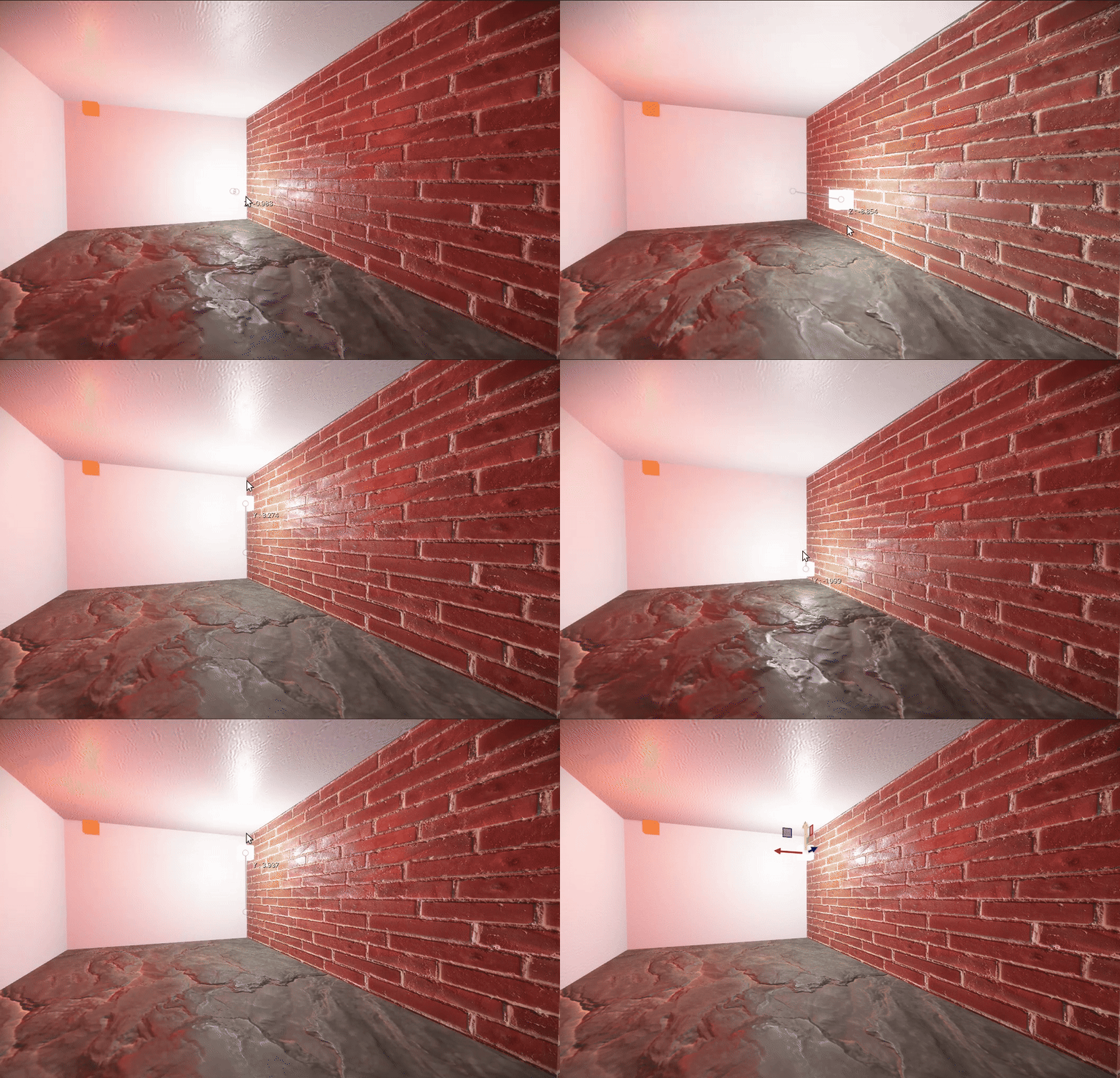
dBrender supports various types of lights, including directional, point, and spot lights.
Dynamic shadows are implemented using Percentage Closer Filtering (PCF), which helps to create soft shadows that more accurately represent the way light interacts with objects in the scene. This technique samples the depth of the shadow map at multiple points within the shadow's area, resulting in smoother transitions between light and shadow.
Each light can be configured to cast dynamic shadows or not.
To preserve performance each shadow is only regenerated when the light moves or the scene changes significantly.

Various post processing effects were implemented to enhance visuals that dBrender can provide.
Bloom

Bloom is a post-processing effect that simulates the way light bleeds around bright areas in a scene, creating a soft glow effect.
Vignette

Vignette is a post-processing effect that darkens the corners of the screen, drawing attention to the center of the image.
Fisheye (HUD)
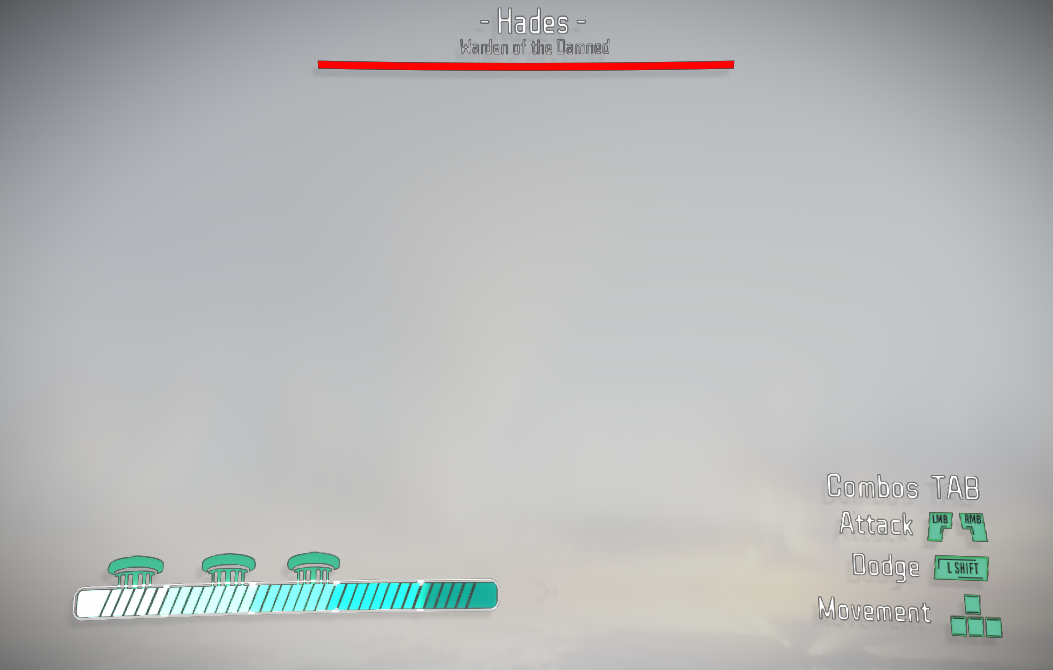
Fisheye is a post-processing effect that creates a wide-angle lens effect, distorting the image to simulate a fisheye lens.


Displacement, glitches (HUD)

Screen shake

Skeletal animation is a technique used to animate characters in a way that allows for smooth movement and blending between different animations. This is achieved by using a skeleton structure, where the character's mesh is attached to a hierarchy of bones. Each bone can be animated independently, allowing for complex movements and poses.
Transition system allows users to create smooth transitions between different animations by blending their weights over time.

High performance was achieved through "flattening" the bones hierarchy, as iteration is faster than recursion.
dBengine features a powerful particle system (CPU side) that allows for the creation of complex visual effects. Particles are small, lightweight objects that can be used to simulate a variety of phenomena, such as fire, smoke, rain, and explosions. The particle system is highly customizable, allowing users to tweak various parameters to achieve the desired look and behavior.
In order to retain performance, particles are using instanced rendering.

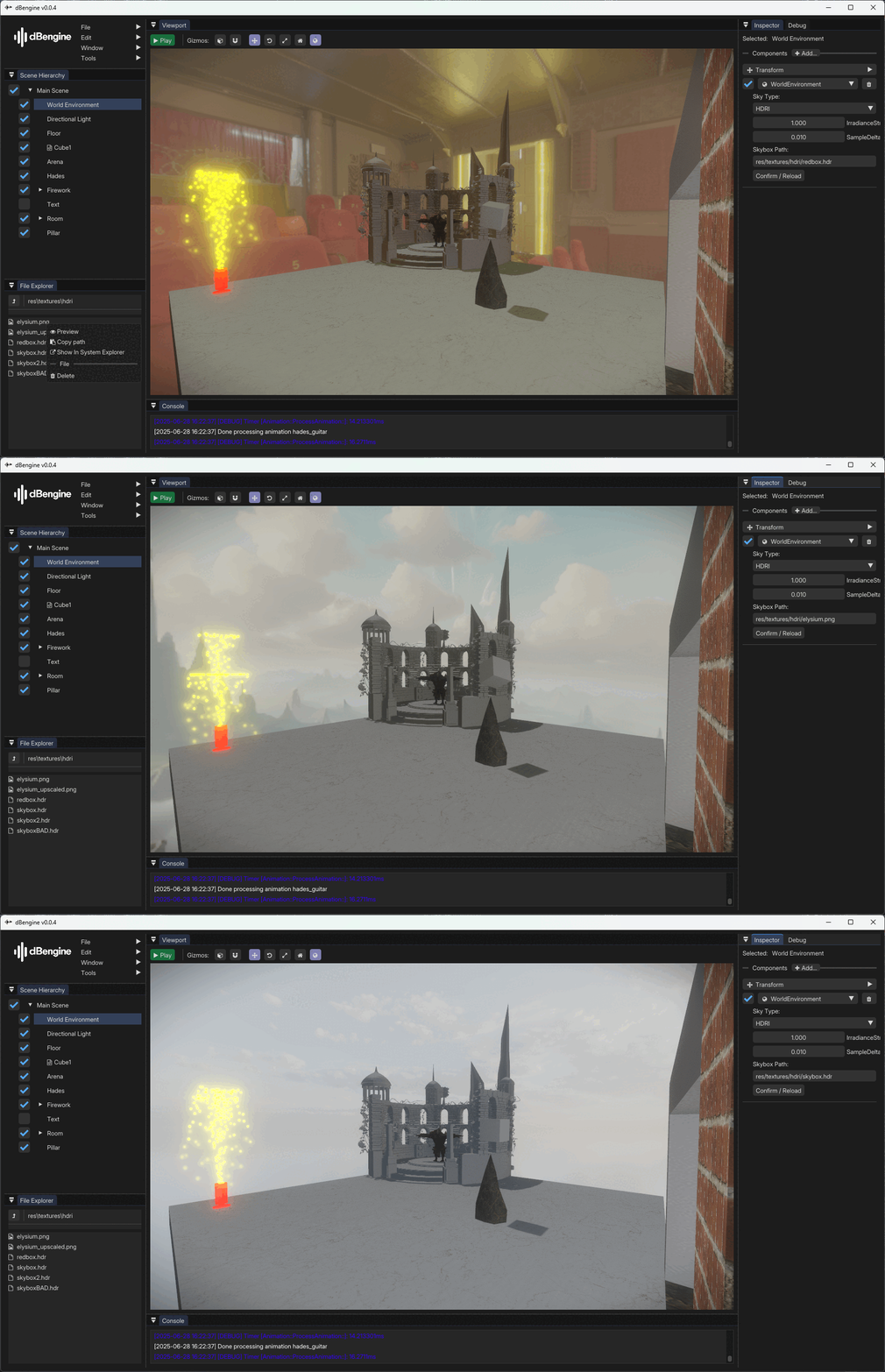
Image-Based Lighting (IBL) is a rendering technique that uses images to provide realistic lighting for 3D scenes. By capturing the lighting information from real-world environments, IBL allows for more accurate and dynamic lighting effects in virtual scenes.

Shader Hot Reloading is a feature that allows users to make changes to shaders and see the results in real-time without restarting the application.
High Dynamic Range (HDR) rendering is a technique used to reproduce a greater range of luminosity than what is possible with standard digital imaging techniques. This allows for more realistic lighting and color representation in 3D scenes.
Engine allows user to set an exposure level used in HDR rendering.
Multisample Anti-Aliasing (MSAA) is a technique used to reduce aliasing artifacts in 3D rendering. By sampling multiple points within each pixel and averaging the results, MSAA produces smoother edges and improved image quality.

MSAA 2x and MSAA 8x, when cube is seen at a distance.
Frustum Culling is a technique used to improve performance by not rendering objects that are outside of the current camera's view frustum.

Objects that are outside the current view are not rendered. As a result, the draw calls count decreases.
dBphysics
dBphysics is the physics engine used by dBengine. It is responsible for simulating physics interactions between game objects, including collision detection and response.
Collision shapes are used in dBphysics to define the physical boundaries of game objects. These shapes are essential for accurate collision detection and response. dBphysics supports two collision shapes: boxes and capsules, allowing for flexible and efficient physics simulations.
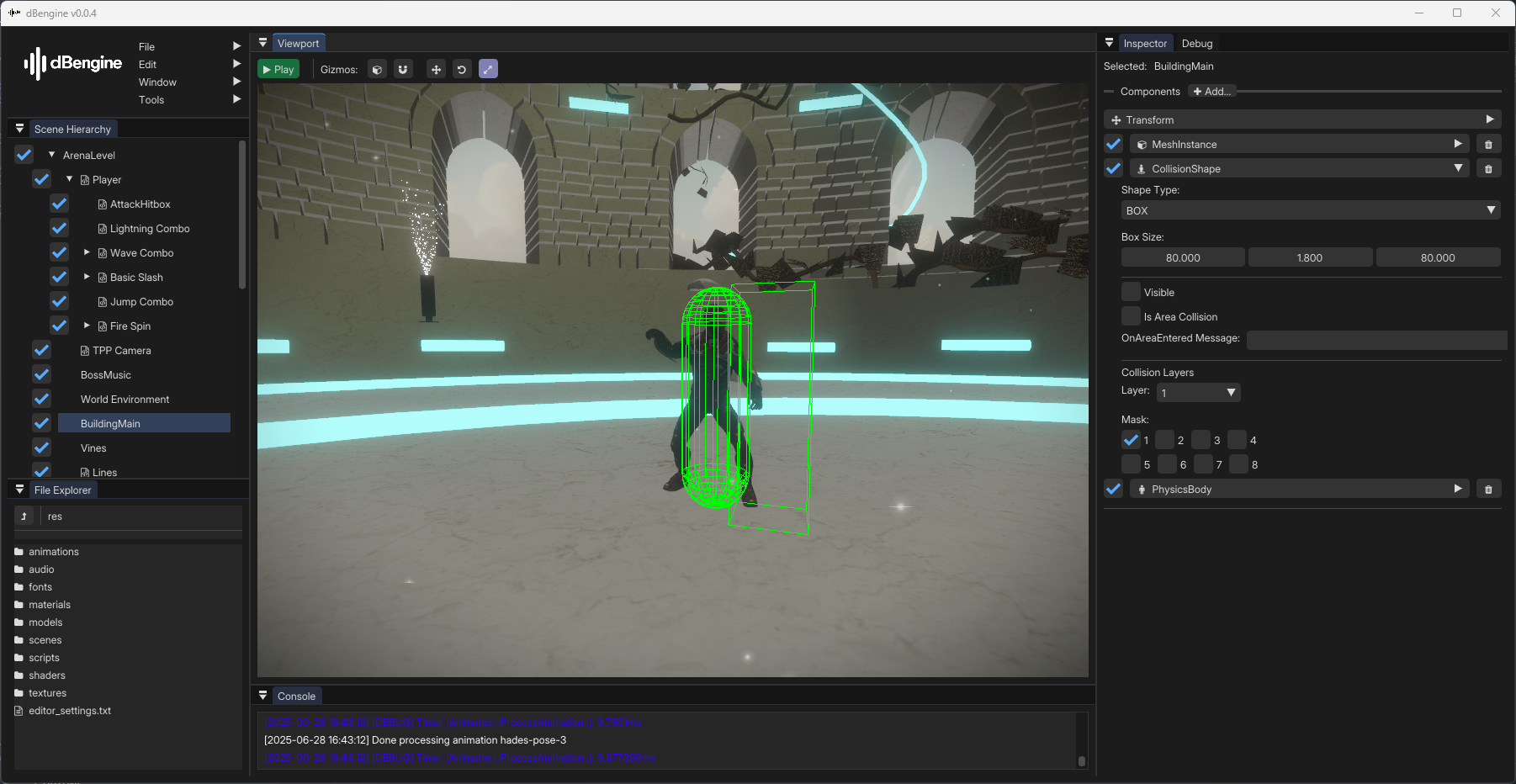
Collision shapes are also capable of masking, which enables selective collision detection based on the object's state or other criteria.
Physics bodies are used in dBphysics to define the physical properties of game objects. These properties include mass, velocity, and friction, which are essential for realistic physics simulations. dBphysics supports two types of physics bodies: dynamic and static.

Physics bodies are affected by gravity (if not static) and can interact with other physics bodies in the scene.
Areas are triggers that detects when other collision shapes enter them.
They are a part of collision shapes, when enabled in inspector.
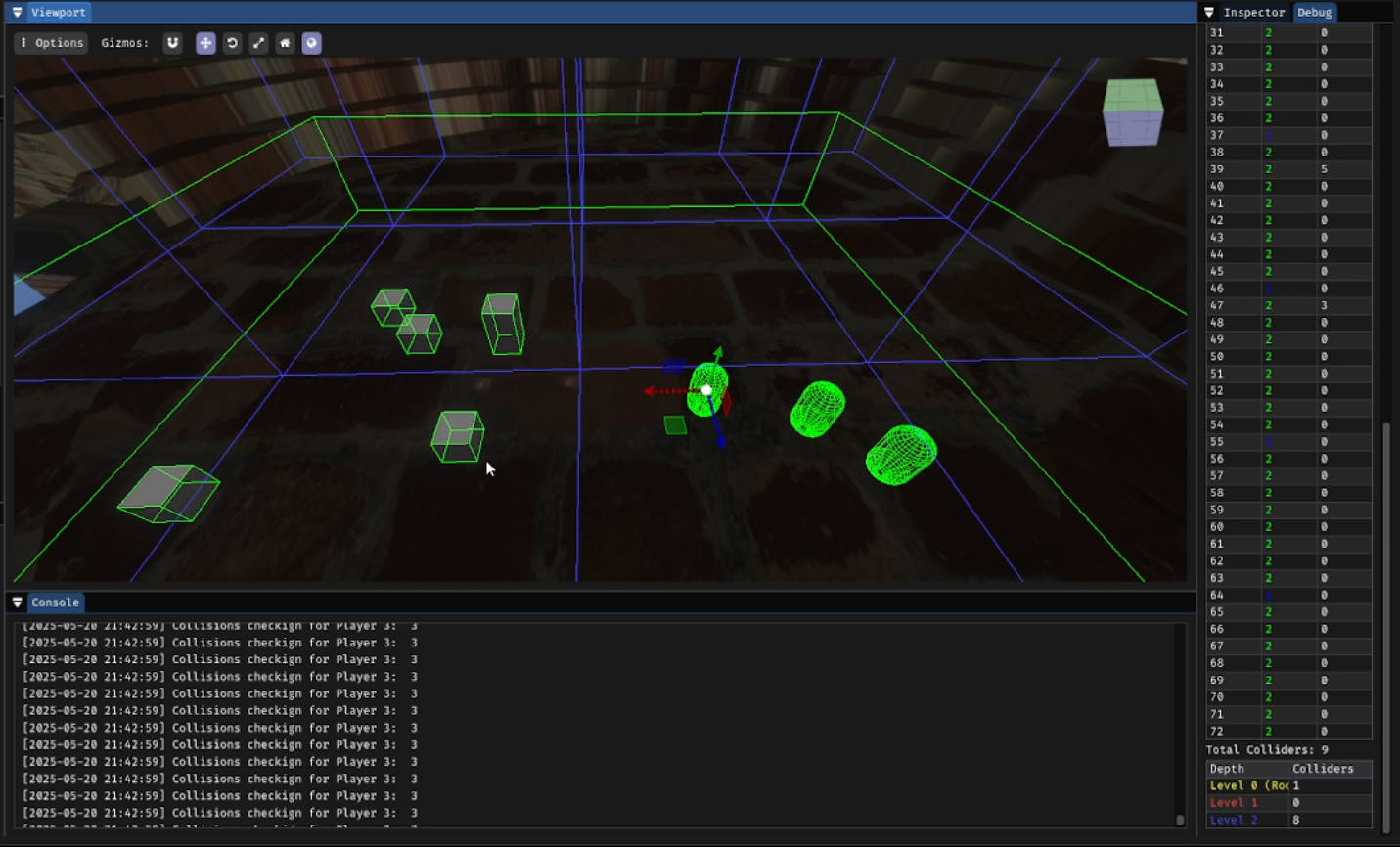
Octrees are a spatial partitioning structure used in dBphysics to efficiently manage and query 3D space. They work by recursively subdividing the 3D space into smaller regions (nodes) to improve the performance of collision detection and other spatial queries.
dBeditor
dBeditor is an integrated dBengine's editor that provides a user-friendly interface for creating and managing game assets.
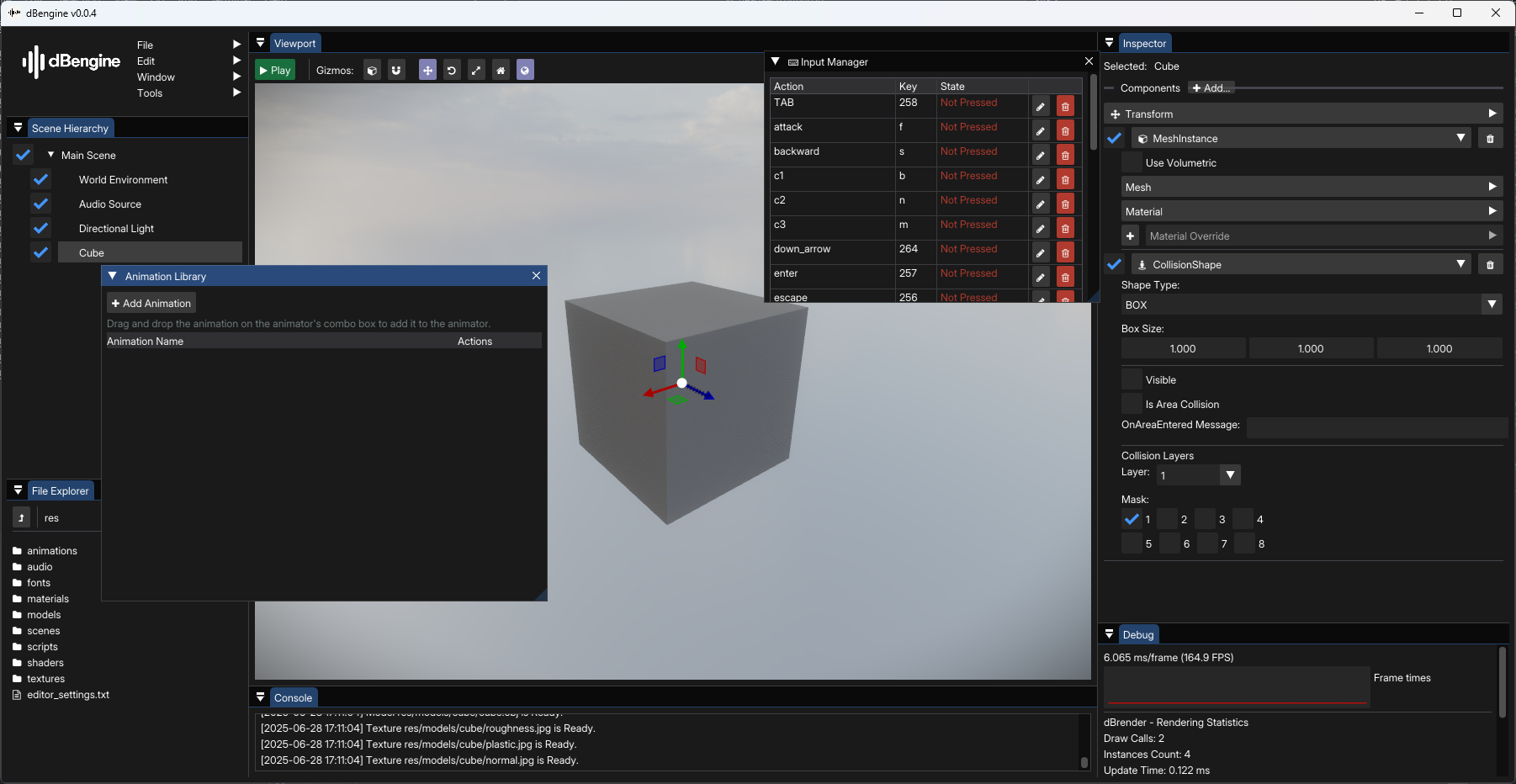
dBengine's editor provides a modern and intuitive interface for users to create and manage game assets efficiently.

The File Explorer in dBeditor allows users to navigate and manage their project files easily. It provides a hierarchical view of all assets, making it simple to organize and locate game resources.
Users can create, delete, and rename files and folders directly within the File Explorer.
Additionally, the File Explorer supports drag-and-drop functionality, allowing users to easily apply assets and resource in the inspector.

File dialog enabled using ImGuiFileDialog library.
Built-in inspector allows users to manage game objects, components and adjust their properties.
Debug view displays important information (like fps, update time, console) to provide insight on game's performance and behavior.
Additionally, users can test shaders and other effects.
Gizmos are visual aids that help developers understand and manipulate the 3D space in their game scenes.
Gizmos were implemented using ImGuizmo library.
Panels are my custom-made widgets used to manipulate properties.
Examples are:
- Transform Panel
- Material Panel
- Min/max values slider
- Vec2 Slider
- Vec3 Slider
- Colored Buttons
Animation library is a container for all animations, resulting in a more organized and efficient workflow. It manages their loading and processing on meshes.
It also makes sure, that an animation is loaded only once to preserve memory.
Structure
dBengine is designed with a mix of Unity's Engine and Godot Engine's approach.
Game Objects are used to define every entity in the scene (UI, 3D, Meshes etc.) and components can be attached to them.
Scenes are everything that can be rendered. What does it mean? Scene can contain a scene (like in Godot Engine), so every composition of game objects can be preserved as a packed scene for a later use.
The Animator component is responsible for controlling animations on a game object. It allows you to create, blend, and manage animations easily.
The Audio Listener component is responsible for receiving audio from the environment, while the Audio Source component is responsible for playing audio clips.
Audio system was built using FMOD library.
The Camera component is responsible for rendering the game world from a specific viewpoint. It defines the player's perspective and controls what is visible on the screen.
The Collision Shape component is responsible for defining the shape of a game object's collider. It is used for detecting collisions with other objects in the game world.
The control component family is responsible for creating UI
It includes:
- Button
- Sprite
- Text
Lights included in dBengine are:
- Directional Light
- Point Light
- Spot Light
Lua component is responsible for creating a Lua server for the script to be
attached to.
It allows users to write scripts in Lua, which can be used to control game logic, events, and interactions.
It's responsible for exposing engine's API to lua scripts.
The Mesh Instance component is responsible for rendering a 3D mesh in the game world. It allows users to define the mesh's geometry, materials, and other properties.
The Particle System component is responsible for creating and managing particle effects in the game. It allows users to define particle properties such as lifetime, size, color, and behavior.
The Physics Body component is responsible for simulating physics on a game object. It allows you to define properties such as mass, friction, and enables collision detection and response.
This component allows users to tag game objects with specific labels for easier identification and organization.
Those tags can later be detected in scripts and used for various purposes, such as filtering or grouping game objects.
The Timer component is responsible for managing time-based events in the game. It allows you to create timers that can trigger actions after a specified duration.
The Transform component is responsible for managing the position, rotation, and scale of a game object in 2D or 3D space.
This component manages the creation of skyboxes and IBL maps.
Download
dBengine and dBeditor is available to download from my GitHub repository. However, all of the development is kept in private repository and when set goals are met, it's then forked to public repository.
All of dBengine's source code is available for everyone as well.
How to run dBeditor?
To run dBeditor all you need to do is launch the dBengine.exe. That's all.
How to run a scene in runtime?
To run a scene in runtime, you can use command line arguments.
To run dBengine from a scene, you need to enter: .\dBengine.exe --scene "path to scene",
where path is placed in res directory for user's convinience.
To run dBengine from a scene with editor disabled, you need to add another argument:
--no-editor.
So final command would look like:
.\dBengine.exe --no-editor --scene "path to scene".